
P365 Optic Mounting Guide
Posted by Lee on Jul 23rd 2025
RMSc, Holosun 507K, RMRcc and Mounting Hardware
Hi y’all, Lee from Norsso here. If you’re building or upgrading a SIG P365, choosing the right optic cut is only part of the equation. The optic footprint, mounting pattern, screw size, screw length, optic deck height, and backup iron sight configuration all need to work together.
In this guide, I’ll walk you through the P365 optic cut options offered by Norsso, explain the differences between the RMSc Shield/Holosun 507K cut and Trijicon RMRcc cut, and cover the hardware requirements for mounting some of the most popular compatible pistol optics.
There are a lot of optic cuts on the market with minor variations between manufacturers. Because of that, the information in this guide applies specifically to Norsso's P365 slides and their designed optic mounting solutions. Always verify the mounting requirements, screw specifications, and torque values in the optic manufacturer's installation manual before installing an optic.
Quick Reference: P365 Optic Mounting Requirements
For a quick overview:
-
Norsso RMSc Shield/Holosun 507K cut slides use an M4 threaded hole.
-
Use the mounting hardware supplied by the optic manufacturer whenever possible.
-
Depending on the optic and deck height, the recommended screw length is generally 8mm to 10mm for Norsso's RMSc Shield/Holosun 507K cut.
-
The Trijicon RMRcc cut is designed specifically for the Trijicon RMRcc optic.
-
RMRcc installations should use the sealing plate and screws supplied by Trijicon.
-
Do not assume that two optics using the same footprint use identical screws.
-
Screw head diameter, profile, length, thread size, and seating depth can vary between optic manufacturers and even between different optic models from the same manufacturer.
-
Always follow the optic manufacturer's instructions for installation and torque specifications.
Use the chart near the end of this guide for a quick reference to P365 optic hardware and backup iron sight recommendations.
Understanding SIG P365 Optic Cuts
The SIG P365 has gone through multiple updates since its original launch. Depending on the specific generation and configuration, you'll find P365 pistols with integrated rear iron sights, optic-ready slides, and different factory optic mounting configurations.
For factory optic-ready P365 models, SIG's optic cut uses an M3 threaded hole surrounded by a raised post feature. Unlike a traditional RMSc Shield footprint, the factory configuration does not use the same four-corner locating post arrangement.
This distinction becomes important when moving an optic from a factory P365 slide to an aftermarket P365 slide.
If you've attempted to install an optic on a Norsso slide using the same optic and screws that worked on your factory SIG slide, you may have discovered that the screws don't fit correctly or the optic won't tighten down as expected.
That's because Norsso's RMSc Shield/Holosun 507K optic cut uses an M4 thread rather than the M3 thread used on the factory P365 configuration.
Understanding these differences before starting your installation can help prevent damaged threads, improper screw engagement, or an optic that doesn't properly seat against the slide.
Norsso P365 Slides and Optic Cuts
Norsso P365 slides were among the early aftermarket P365 slides designed from solid material while incorporating an optic cut with backup iron sight capability.
This design approach gives Norsso the flexibility to independently engineer the optic cut and iron sight configuration rather than simply replicating the factory slide.
With the exception of the P365-FUSE, Norsso's P365 slide variants use the same primary optic cut options covered in this guide.
Norsso offers two primary optic cut configurations for its stocked P365 slides:
-
RMSc Shield/Holosun 507K Cut
-
Trijicon RMRcc Cut
Both are designed for direct mounting of compatible optics using the appropriate manufacturer-supplied mounting hardware.
While Norsso can provide hardware guidance for many popular optics, it's important to understand why mounting hardware isn't necessarily interchangeable between different optics.
Why P365 Optic Mounting Hardware Varies
Modern micro red dot optics have to fit a tremendous amount of technology into a very small package. Manufacturers also have to work within the dimensional limitations of established optic footprints.
As a result, optic manufacturers often make small changes to their mounting hardware to accommodate the specific design of each optic.
Two optics can use the same general footprint and still require different screws.
Differences can include:
-
Screw thread size
-
Overall screw length
-
Screw head diameter
-
Screw head profile
-
Screw head height
-
Counterbore dimensions
-
Thread engagement
-
Optic deck height
-
Sealing or mounting plates
These differences matter when installing an optic directly to a P365 aftermarket slide.
For example, several optics may use an RMSc-style footprint and 4mm mounting screws, but the screw head profiles can be different.
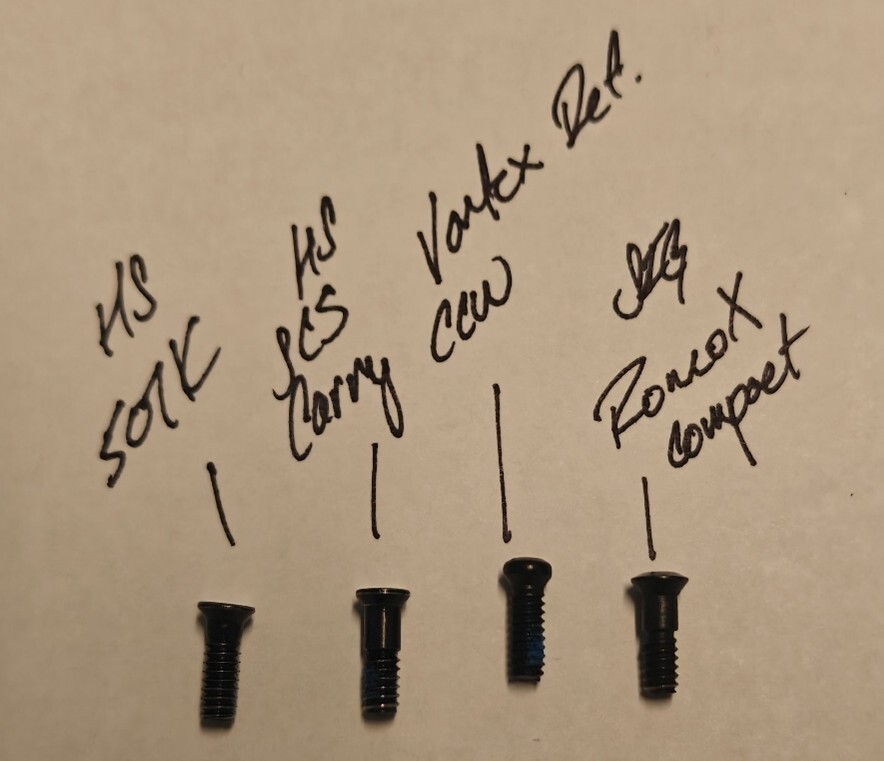
The same principle applies even between different Holosun models.
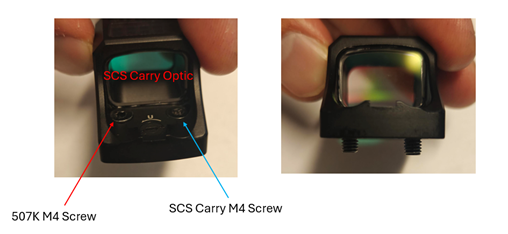
A screw supplied with a Holosun 507K, for example, may have a different head diameter than a screw supplied with the Holosun SCS Carry. The 507K screw may not properly seat within the SCS Carry's counterbore because the screw head is larger.
Why Using the Correct P365 Optic Screws Matters
Using the wrong screw can cause several problems.
If the screw head doesn't properly fit into the optic's mounting surface, tightening it can potentially damage the optic body. In some situations, using incorrect hardware may also affect your optic manufacturer's warranty.
Incorrect screw length can create another problem.
If the screw is too short, there may not be enough thread engagement between the screw and slide. That can reduce the amount of material holding the optic in place.
On the other hand, a screw that is too long can bottom out in the threaded hole before the optic is properly secured.
The safest approach is simple:
Use the hardware supplied by the optic manufacturer and follow the manufacturer's installation instructions.
Don't assume that a screw from another optic is interchangeable simply because both optics use the same footprint.
Keeping each optic's hardware organized can also prevent accidental hardware swaps during installation.
P365 RMRcc Optic Cut
Norsso's Trijicon RMRcc optic cut is designed specifically around the Trijicon RMRcc.
At the time this guide was published, the RMRcc footprint was not widely adopted by other optic manufacturers, meaning your optic selection is considerably more limited than it is with the RMSc Shield/Holosun 507K cut.
If you choose an RMRcc-cut Norsso P365 slide, make sure the RMRcc is the optic you want to run before ordering your slide.
For RMRcc installations, use the sealing plate and screws supplied by Trijicon and follow Trijicon's installation instructions and torque specifications.
If you aren't sure which optic you want to use, the RMSc Shield/Holosun 507K option offers significantly more optic choices.
Norsso’s RMSc shield/Holosun 507K Cut Anatomy:
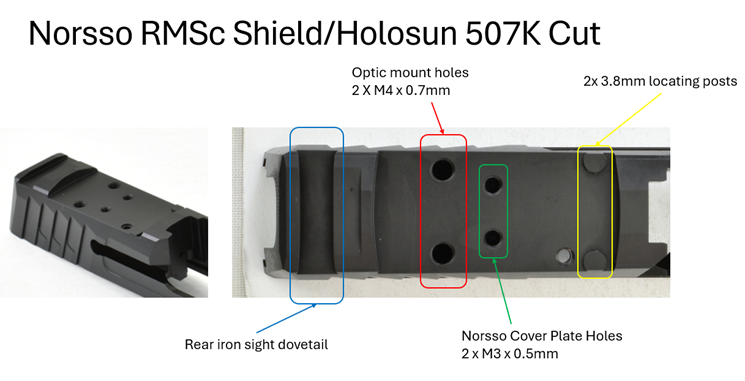
Norsso RMSc Shield/Holosun 507K P365 Optic Cut
Norsso designed its RMSc Shield/Holosun 507K cut around a specific mounting configuration that differs from the factory SIG P365 optic cut.
The Norsso design uses the two front locating posts while eliminating the two rear posts.
The primary mounting features include:
-
M4 x 0.7 threaded mounting holes
-
Two front optic locating posts
-
No rear locating posts
-
Rear iron sight dovetail
-
Optic cut depth designed around available backup iron sight configurations
-
Compatibility with a broad range of optics using the appropriate mounting hardware
Norsso uses the larger M4 mounting screw rather than the M3 screw used on the factory P365 configuration.
The larger thread size provides increased screw shear strength while also helping reduce the likelihood of cross-threading.
Two additional M3 threaded holes are incorporated into some Norsso slides for the company's optic cover plate.
These holes are positioned farther toward the center of the slide so the screw heads don't protrude from the sides. This helps reduce potential snag points while maintaining a clean appearance.
The rear iron sight dovetail is positioned toward the back of the slide to maximize sight radius while providing additional options for sight depth relative to the firing axis.
Because space is limited between the optic and rear sight, Norsso recommends using an optic-ready or optic-compatible rear iron sight with a compact profile.
Note: The P365-FUSE slide uses a different footprint. Even if an optic has the same general compatibility designation, do not assume the FUSE slide uses the same mounting configuration described here.
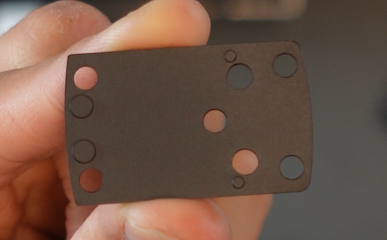
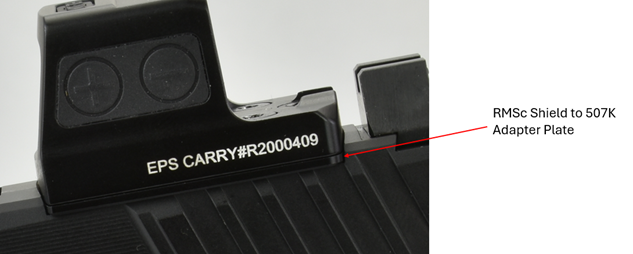
The second aspect allows you to avoid using the Holosun adapter plate they include to convert from the full RMSc shield footprint that has all 4 locating posts. That way you’re not forced to push the optic up higher by using the plate shown below.
Three Important Features of the Norsso P365 RMSc Cut
There are three major design differences to understand when using the Norsso RMSc Shield/Holosun 507K cut.
1. Norsso Uses an M4 Thread
Norsso uses an M4 x 0.7 threaded hole rather than the M3 x 0.5 thread used on the factory P365 slide, excluding the P365-FUSE.
This means factory SIG P365 optic screws may not be compatible with a Norsso slide.
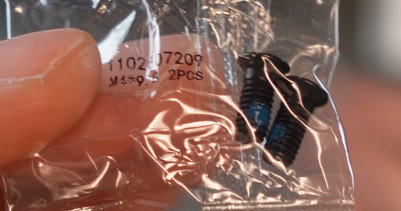
If you're moving a Holosun optic from a factory P365 slide to a Norsso slide, check the original optic packaging for the appropriate M4 mounting screws.
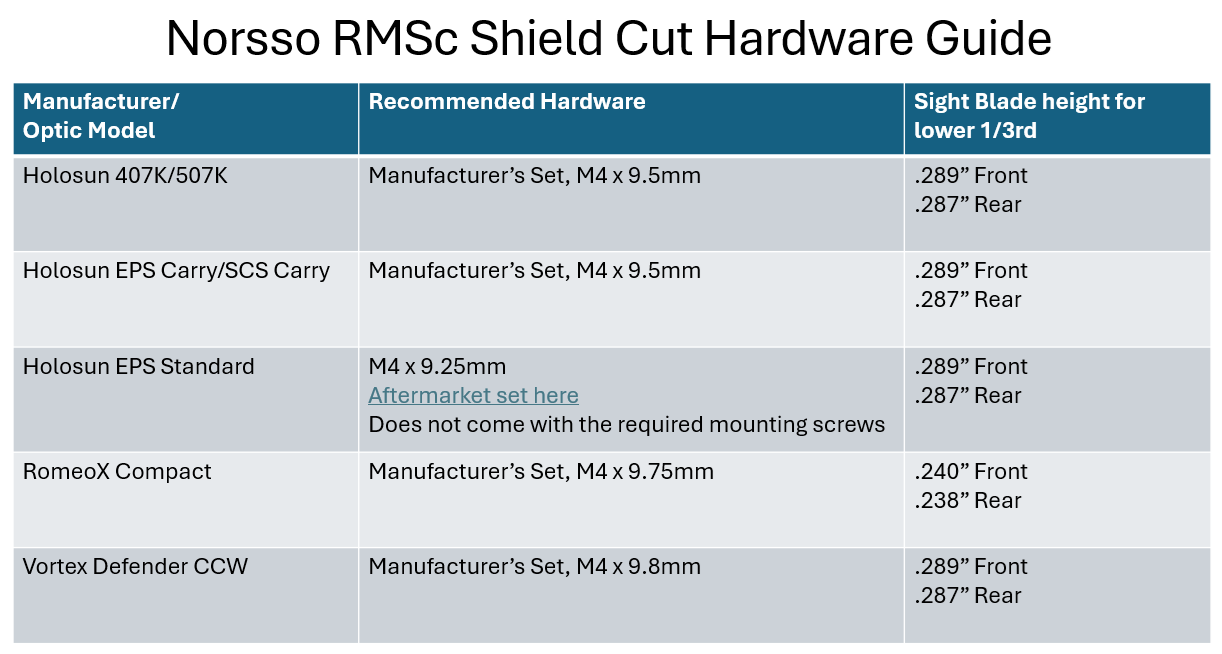
For the Norsso RMSc Shield/Holosun 507K cut, screws measuring approximately 8mm to 10mm in overall length are generally appropriate, depending on the optic's deck height and specific hardware configuration.
Some optic revisions may include different screw lengths, so don't rely solely on the length listed in this guide. Always confirm compatibility with the optic manufacturer.
2. Norsso Uses Two Front Locating Posts
The Norsso cut retains the two front locating posts while removing the two rear posts.
This allows compatible optics to mount directly without requiring the adapter plate supplied with some optics to convert between footprint configurations.
For example, certain Holosun optics include an adapter plate designed to accommodate the full RMSc Shield footprint with four locating posts.
Using that adapter plate can raise the optic.
By designing the Norsso cut around the two front locating posts, compatible optics can be mounted directly to the slide without unnecessarily adding the height of an adapter plate.
3. The Optic Cut Depth Affects Backup Iron Sights
The third consideration is the depth of the optic cut.
Norsso designed the cut to provide a lower 1/3 co-witness configuration with compatible suppressor-height sights, rather than replicating the exact depth of the factory optic cut.
This matters if you plan to use backup iron sights (BUIS).
Backup iron sights provide an alternative aiming system if an electronic optic becomes unavailable or inoperable.
Because micro red dots have different deck heights and manufacturers continue to introduce new optic designs, there isn't necessarily one universal rear sight height that works perfectly with every optic.
Norsso offers three recommended iron sight height options based on the specific optic being used.
P365 Optic Screw Length: 8mm, 10mm and 12mm
One of the most common questions when mounting an optic to a Norsso P365 slide is:
What length screws should I use?
For the Norsso RMSc Shield/Holosun 507K cut, the general recommendation is 8mm to 10mm, depending on the optic's deck height and the manufacturer's supplied hardware.
However, you should always use the exact hardware specified by your optic manufacturer whenever available.
Some revisions may include screws as long as 12mm. A screw that is too long can potentially bottom out in the threaded hole before the optic is properly secured.
In other words, longer does not automatically mean better.
The screw must provide sufficient thread engagement without bottoming out.
P365 Backup Iron Sight Recommendations
If you're building a P365 with an optic and backup iron sights, the optic's deck height needs to be considered alongside the height of the front and rear sights.
The goal is to select a sight height that works with the specific optic while maintaining the desired sight picture.
Norsso's optic cut was designed around the available iron sight configurations and aims to provide a lower 1/3 co-witness with compatible suppressor-height sights.
Because optic designs vary, the recommended sight height can change depending on the optic you're installing.
Use the Norsso reference chart below to identify the recommended optic hardware and backup iron sight configuration for your specific optic.
P365 Optic Cut and Hardware Quick Reference
| Optic Cut | Compatible Optic | Thread | Hardware |
|---|---|---|---|
| RMSc Shield/Holosun 507K | Compatible RMSc/507K-style optics | M4 x 0.7 | Use optic manufacturer's hardware; generally 8–10mm |
| Trijicon RMRcc | Trijicon RMRcc | Manufacturer-specified | Use Trijicon sealing plate and supplied screws |
| P365-FUSE | Different configuration | Verify separately | Follow FUSE-specific specifications |
Important: This table is a general reference and should not replace the installation instructions supplied with your optic.
Common P365 Optic Mounting Mistakes
Understanding the optic footprint is only the first step. Avoid these common mistakes when installing an optic on a Norsso P365 slide.
Using Factory SIG Screws on an M4 Norsso Cut
Factory P365 optic configurations may use M3 screws, while Norsso's RMSc Shield/Holosun 507K cut uses M4 threads.
The factory screws therefore aren't automatically compatible.
Mixing Screws Between Optics
Don't assume that screws from one Holosun optic will work with another Holosun optic.
Even optics from the same manufacturer can use different screw head profiles and dimensions.
Using Screws That Are Too Long
A screw can appear to fit while still being too long for the specific slide and optic combination.
A screw that bottoms out can prevent the optic from being properly clamped to the slide.
Using Screws That Are Too Short
Insufficient thread engagement can reduce the holding force between the optic and slide.
Assuming Every RMSc Optic Uses the Same Hardware
The footprint tells you where the mounting holes and locating features are positioned. It does not necessarily mean every optic using that footprint uses identical screws.
Ignoring Optic Manufacturer Torque Specifications
Always follow the optic manufacturer's installation instructions and specified torque values.
Choosing the Right P365 Optic Cut
If you already know you want to run the Trijicon RMRcc, the Norsso RMRcc cut provides a dedicated mounting solution for that optic.
If you want more flexibility when selecting a micro red dot, the RMSc Shield/Holosun 507K cut provides a broader range of compatible optics from different manufacturers.
Before ordering a P365 slide, consider:
-
Which optic you plan to use
-
Which footprint the optic requires
-
Which mounting screws the optic manufacturer supplies
-
Screw diameter and length
-
Optic deck height
-
Whether you want backup iron sights
-
Desired co-witness height
-
Whether an adapter plate is required
-
Whether your slide is a standard P365 configuration or P365-FUSE
Taking these factors into consideration before ordering can make the installation process much easier.
Custom P365 Slide Configurations
Some Norsso slides are available without an optic cut for shooters who prefer a traditional iron-sight configuration.
Norsso can also machine custom sight dovetail locations in front of or behind the optic. For race-style configurations, sight dovetails can also be removed entirely.
These custom configurations are being streamlined for the Norsso website, but customers looking to start a custom P365 slide configuration can contact Norsso directly for assistance.
Final Thoughts on P365 Optic Cuts and Mounting Hardware
Choosing an optic for your P365 involves more than simply matching the optic footprint to the slide.
The optic cut, mounting thread, screw dimensions, screw length, optic deck height, and backup iron sight configuration all need to work together.
Norsso's RMSc Shield/Holosun 507K cut uses an M4 x 0.7 mounting thread, while the factory P365 configuration uses M3 hardware. This is one of the most important differences to understand when moving an optic from a factory P365 slide to a Norsso aftermarket slide.
For the RMSc Shield/Holosun 507K cut, use the appropriate M4 hardware supplied by the optic manufacturer, with approximately 8mm to 10mm screw length being typical depending on the optic.
For the RMRcc cut, use the Trijicon RMRcc sealing plate and supplied screws.
Most importantly, don't mix and match optic hardware simply because two optics share a footprint. Small differences in screw head diameter, profile, length, and thread engagement can make a significant difference during installation.
Always consult the optic manufacturer's installation manual for the correct hardware and torque specifications before installing your optic.
Thanks for reading, and we hope this guide helps you make an informed decision when choosing your next Norsso P365 slide and optic configuration.
Be sure to checkout Norsso on Instagram!